§00 — Coilo · Windows
Coilo
Find it. Test it. Hand it over.
The Windows tool for Modbus commissioning and fault finding: find every device on the line, test each point without risk, and hand the client a report of what you proved.
- Windows 10 / 11
- Modbus TCP
- Modbus RTU
- RTU over TCP
- Works offline
- 12 languages
§01 — Screens
The program itself
§02 — Features
Free to test, Pro to commission
Modbus TCP, RTU and RTU over TCP
USB to RS-485 adapters, RS-232 and serial-to-Ethernet converters; function codes 01–06, 15 and 16, eight data types, four byte orders.
Writes that cannot surprise you
Writing is locked until you unlock it; every write is read back and checked, and the values before it go back with one click.
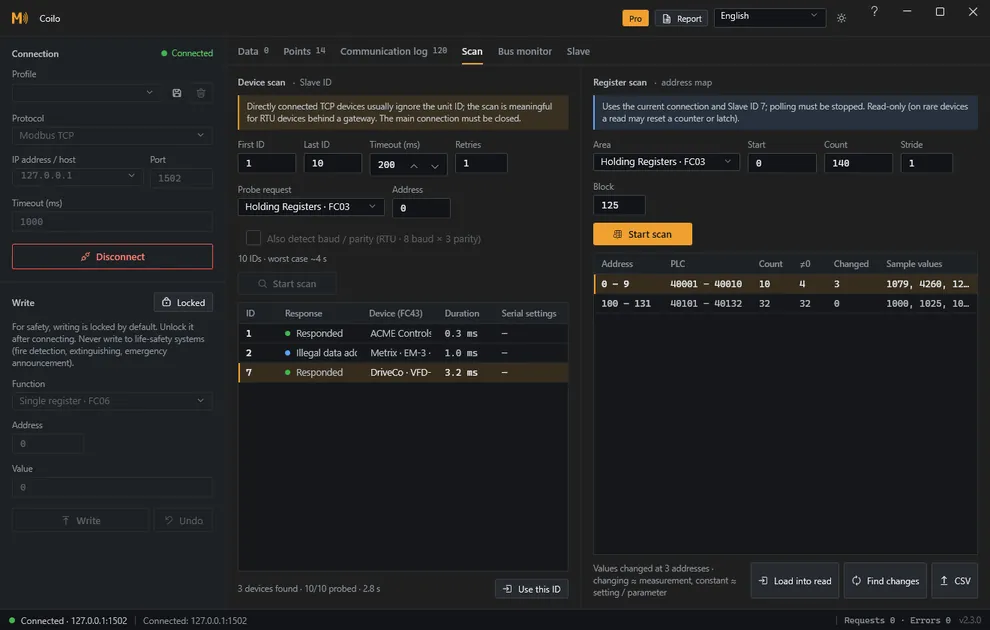
Find the devices on a line
Slave ID scan with baud rate and parity detection, and the device's identity (FC43): vendor, model, version.
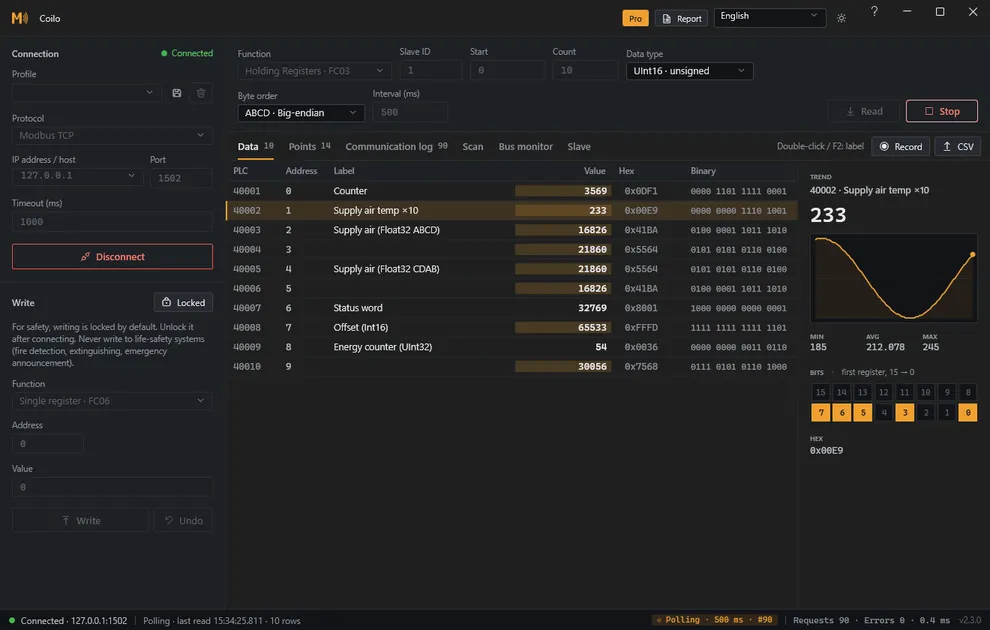
Polling, trend and bit grid
Periodic reads from 100 ms to 60 s with changed values marked, a trend of the last 120 samples, a register's 16 bits, labels, profiles and CSV export.
See the line itself
Success rate, timeouts, exceptions and p95 latency per slave, and the raw frames as they went out and came back.
Register map discoveryPro
Maps a device without documentation: which address ranges answer, which raise exceptions and which values change, exported as CSV.
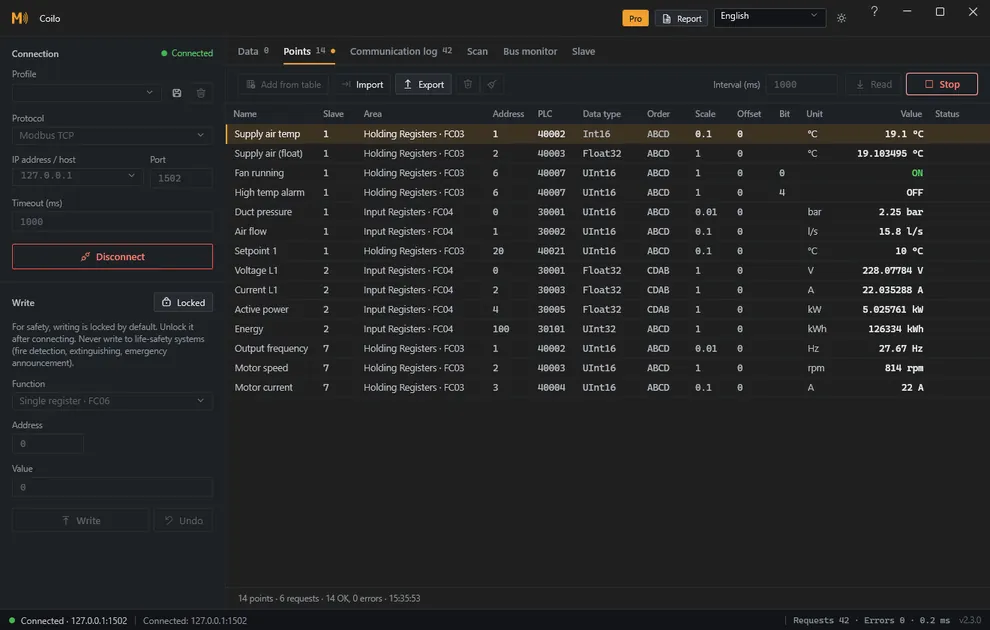
Point listPro
The vendor's register list with type, byte order, scale and unit per point, across slaves; CSV in and out, requests merged automatically.
Long-term recordingPro
Hours or days of polled values to CSV, for the fault that never happens while you watch.
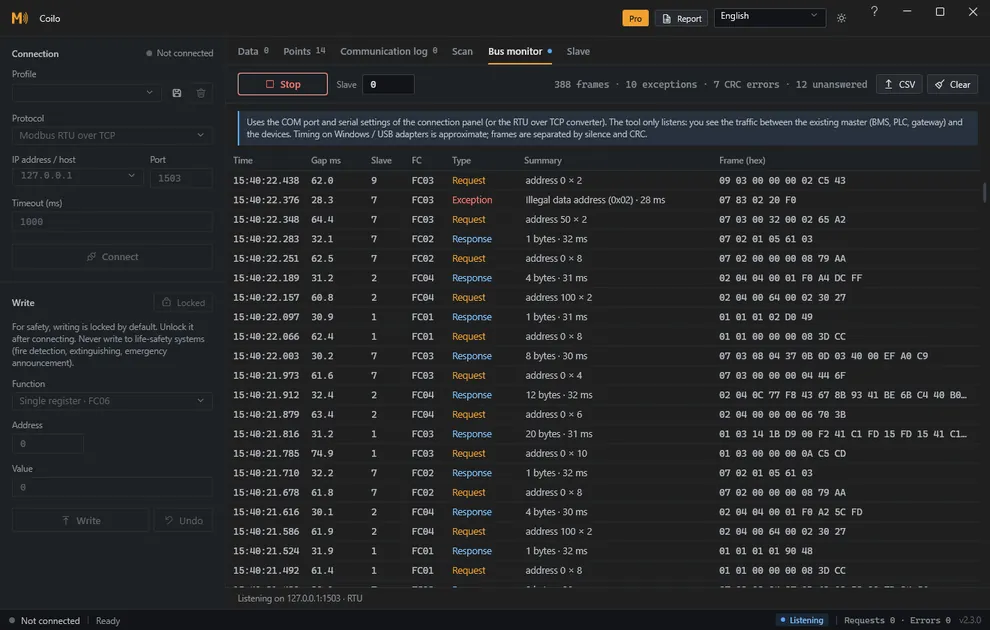
RS-485 bus monitorPro
Listens to a live line without transmitting: requests paired with responses, exceptions, CRC errors, latency and the polls nobody answered.
Slave modePro
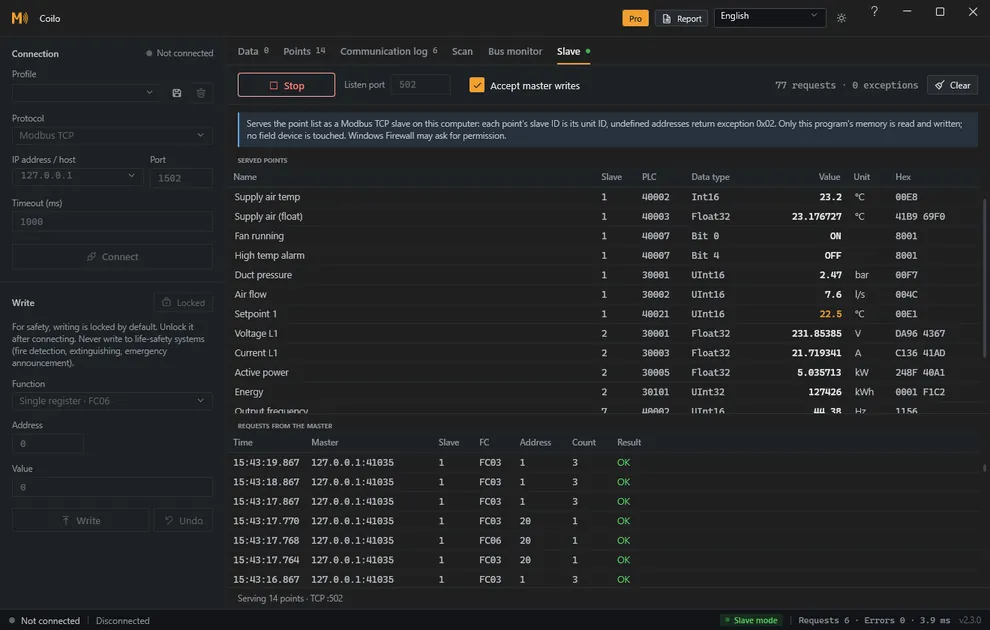
Serves the point list as a Modbus TCP or RTU slave, so the BMS or SCADA master is tested before the device arrives.
Commissioning reportPro
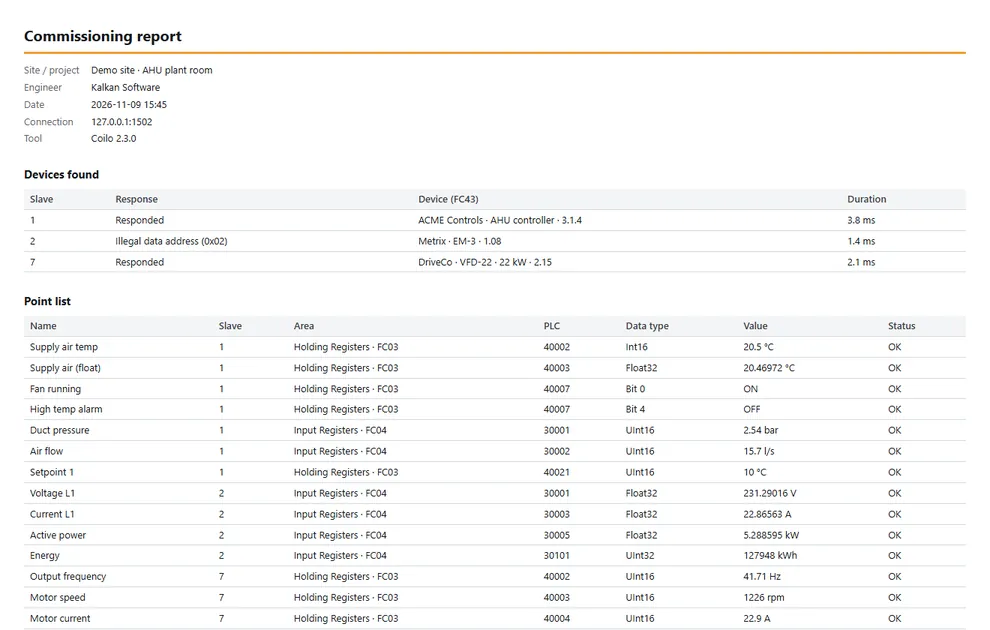
Devices found, the point list, communication quality and the register map in one HTML file that prints to PDF.
§03 — Editions
Free and Pro
| Free and Pro | FreeFreeA complete manual test tool, business use included, with no time limit. | Pro49 USD per seatThe kit for a whole job: six tools, unlocked with one key. |
|---|---|---|
| Connect, read and write safely | Included | Included |
| Find the devices on a line | Included | Included |
| Polling, trend and diagnostics | Included | Included |
| Commercial use | Included | Included |
| The six commissioning tools | Not included | Included |
§04 — Price
Price
49 USD per seat
- One payment per seat, plus tax where it applies. No subscription.
- 12 months of updates included. Every version released in that time keeps working, without time limit.
- The key is checked on your computer: no account, no internet, no activation server.
- One seat is one computer; to move it to another, remove Coilo from the old one.
- 14-day refund, no questions asked.
Paddle.com is the Merchant of Record for all our orders: it handles the payment, the invoice, sales tax and refunds.
Buy Pro · Pro sales open soon
§05 — Requirements
Platform and download
- System
- Windows 10 or 11, 64-bit
- Install
- Installer without admin rights, or a portable zip; no .NET to install
- Serial
- Any USB to RS-485 adapter, or a serial-to-Ethernet converter
- Languages
- Twelve: English, Turkish, German, French, Spanish, Italian, Dutch, Russian, Arabic, Chinese, Japanese, Korean
- Telemetry
- None. Besides your devices it contacts only GitHub, to check for updates; that can be turned off
Installer recommended, no admin rights needed
Coilo-win-Setup.exe · 77.8 MB
SHA-256
2b29c8f525dc6b151f220aa94aeae7d5976ed505aeb9724797287b1f4b116491Portable zip no install: unzip and run
Coilo-2.3.1-win-x64.zip · 70.6 MB
SHA-256
158e8f70d90a7e2b61274a87d37440963678f2c8ef734c89e35f568c84874c70Demo simulator three Modbus TCP devices on your computer, to try Coilo without hardware
ModbusSimulator.exe · 33.8 MB
SHA-256
ea4ded25d755d2306e475e6af2c4ae57fd0624919e696e79ccc13c1a7f8bfbba
Version 2.3.1 · Released · Release page on GitHub
The files are not code-signed yet, so your browser may warn about the download, and Windows SmartScreen may stop the first start: choose More info, then Run anyway. Check the file against its SHA-256 first.
§06 — FAQ
Questions and answers
- What is the difference between Free and Pro?
- Free is a complete manual test tool: connect, find devices, read and write safely, poll and trend. Pro adds what a whole commissioning job needs: register map discovery, point lists, long-term recording, the bus monitor, slave mode and the commissioning report.
- Can I try Pro before buying?
- There is no Pro trial. Free has no time limit, and if Pro does not fit your work you get a full refund within 14 days.
- Does it need an internet connection?
- No. It talks to your Modbus devices, and the licence key is checked on your computer, so it works in plant rooms without internet. When it is online it asks GitHub for a new version shortly after it starts and once a day, sending no licence, email or machine ID; you can turn that off in About (F1).
- Can I move my licence to another computer?
- Yes. One seat is one computer: remove Coilo from the old one and enter your licence key on the new one.
- What happens after the 12 months?
- Nothing stops. Every version released during your update period keeps working, without time limit; versions released later need a renewed licence.
- Can I get a refund?
- Yes, within 14 days of purchase, without giving a reason. Paddle handles refunds; a refunded licence key is revoked and may stop working in later versions.
- Can I get an invoice for my company?
- Yes. Paddle issues it: enter your company name and VAT ID at checkout.
- Which connections does it support?
- Modbus TCP (IP address or host name), Modbus RTU over RS-485 or RS-232, and Modbus RTU over TCP through a serial-to-Ethernet converter.
- Was Coilo called ModbusTool?
- Yes, up to version 2.2. Profiles, point lists and licence keys from ModbusTool keep working in Coilo.
Modbus® is a registered trademark of Schneider Electric USA, Inc. Coilo is not affiliated with or endorsed by Schneider Electric or the Modbus Organization. Windows is a trademark of the Microsoft group of companies.